
eRequests
Send electronic referrals with the click of a button.
-
What are eRequests?
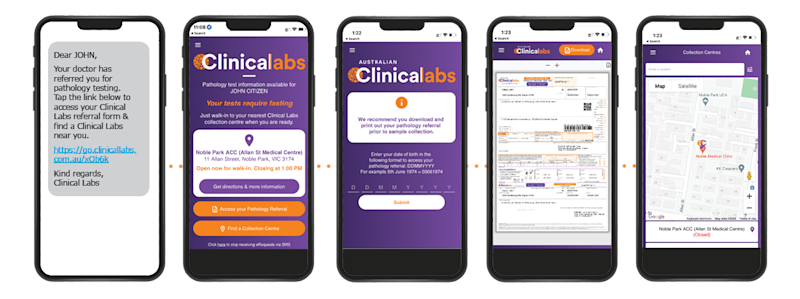
eRequests allow Clinical Labs referrers to easily send patients an electronic copy of their referral to their mobile phone via SMS at no extra charge. This not only saves time but also enhances the patient experience, allowing patients to present to a Clinical Labs collection centre without a printed form. eRequests offer a range of beneficial features for both you and your patients, including:
- Support for telehealth consultations
- Improved accuracy of pathology ordering
- Enhanced convenience for patients
- Time-saving and environmentally friendly
- No additional cost to your practice
- Displays the nearest collection centre, including hours and directions
eRequests is able to be activated with most practice management software. Select the relevant PMS below for more information:
-
eRequests with Genie and Gentu
eRequests are available for Clinical Labs referrers using Genie and Gentu. eRequests streamline pathology request workflows by enabling you to easily send patients an electronic copy of their pathology referral via SMS.
How to Send eRequests with Genie and Gentu
eRequests is simple to use with Genie and Gentu, and for most users, it will be ready and waiting for you to start using. Select 'Australian Clinical Labs' as your laboratory provider to ensure you are using the correct test menu. Once you have submitted your eRequest, your patient will soon receive an SMS, free of charge, containing their electronic pathology referral. If you still wish to print out a pathology request form, simply select the 'Print and Send' option.Further resources
-
eRequests with Best Practice
eRequests streamline pathology request workflows by enabling you to easily send patients an electronic copy of their pathology referral via SMS.
Best Practice users must have eOrders activated to start using eRequests. Please see the instructions at the bottom of this page on how to register for eOrders.
How to Send eRequests with Best Practice
Ensure your patient’s mobile number is accurately recorded in the correct field within the Best Practice patient file. Type 'Telehealth' into the clinical notes, and the patient's pathology request form will be sent to them via SMS. The patient can then tap the link in the SMS, and they will be taken to our eRequest home portal, where they can find their nearest Clinical Labs collection centre and the digital request form. If there is no mobile number associated with the patient, the eRequest will be sent to their email address instead.Turn on Automatic eRequests for Best Practice Users
If you would like eRequests enabled for all your Best Practice pathology requests, please email clinic-registrations@clinicallabs.com.au with your clinic details, and our eHealth team can configure this for your clinic. You will still be able to deactivate the SMS if required by typing ‘NO SMS’ into the clinical notes.Further resources
-
eRequests with MedicalDirector Clinical
eRequests streamline pathology request workflows by enabling you to easily send patients an electronic copy of their pathology referral via SMS. MedicalDirector Clinical must have eOrders activated to start using eRequests. Please see instructions at the bottom of this page on how to register for eOrders.
How to Send eRequests with MedicalDirector Clinical
When completing your eOrder with Clinical Labs, you will see three options for referral delivery:- Email referral form to patient
- SMS referral form to patient
- Download and print referral form
If you check the box titled ‘SMS referral form to patient’, your patient will soon receive an SMS with a link to their personalised pathology referral portal.
Further resources
-
Need eOrders? Register today in just a few easy steps.
eOrders for Best Practice
- Complete the Clinical Labs eHealth registration form
- Save and email the registration form to clinic-registrations@clinicallabs.com.au
- Our eHealth Support Team will contact you to complete the setup.
- Once eOrdering has been configured, it will automatically be active when you select ‘Australian Clinical Labs’ as your preferred laboratory.
eOrders for MedicalDirector Clinical
- Complete the Clinical Labs eHealth registration form
- Save and email the registration form to clinic-registrations@clinicallabs.com.au
- Ensure ‘Australian Clinical Labs’ or ‘Clinical Labs’ is in your address book.
- Select us as the ‘… Preferred laboratory’ and tick ‘Default to eOrder service …’
- eOrders will launch when the ‘order pathology/test tube’ icon is selected.
eOrders via eResults (No PMS required)
- eOrders can now be sent via Clinical Labs’ powerful online results platform, eResults, with no practice management software required. To get access to eResults, register online here. To find out more about eResults, click here.
Related Pages
eResults
eResults is an online platform and patient result viewer that gives you real-time, 24/7 access to patient results via your computer desktop viewer or mobile app.
CPD Programs
Join thousands of GPs nationwide by participating in our RACGP-approved CPD programs.
eDownloads
Clinical Labs eDownloads automates the secure and direct transfer of patient pathology results into referrers' practice management software.